# Contact list

The Contacts list section is used to create contacts for outgoing interactions.&#x20;

Different communication channels can be specified for each contact, for example, several phone numbers, email addresses, instant messengers, etc.

<figure><img src="/files/8xkjX3171hVXyHeI3cdp" alt=""><figcaption></figcaption></figure>

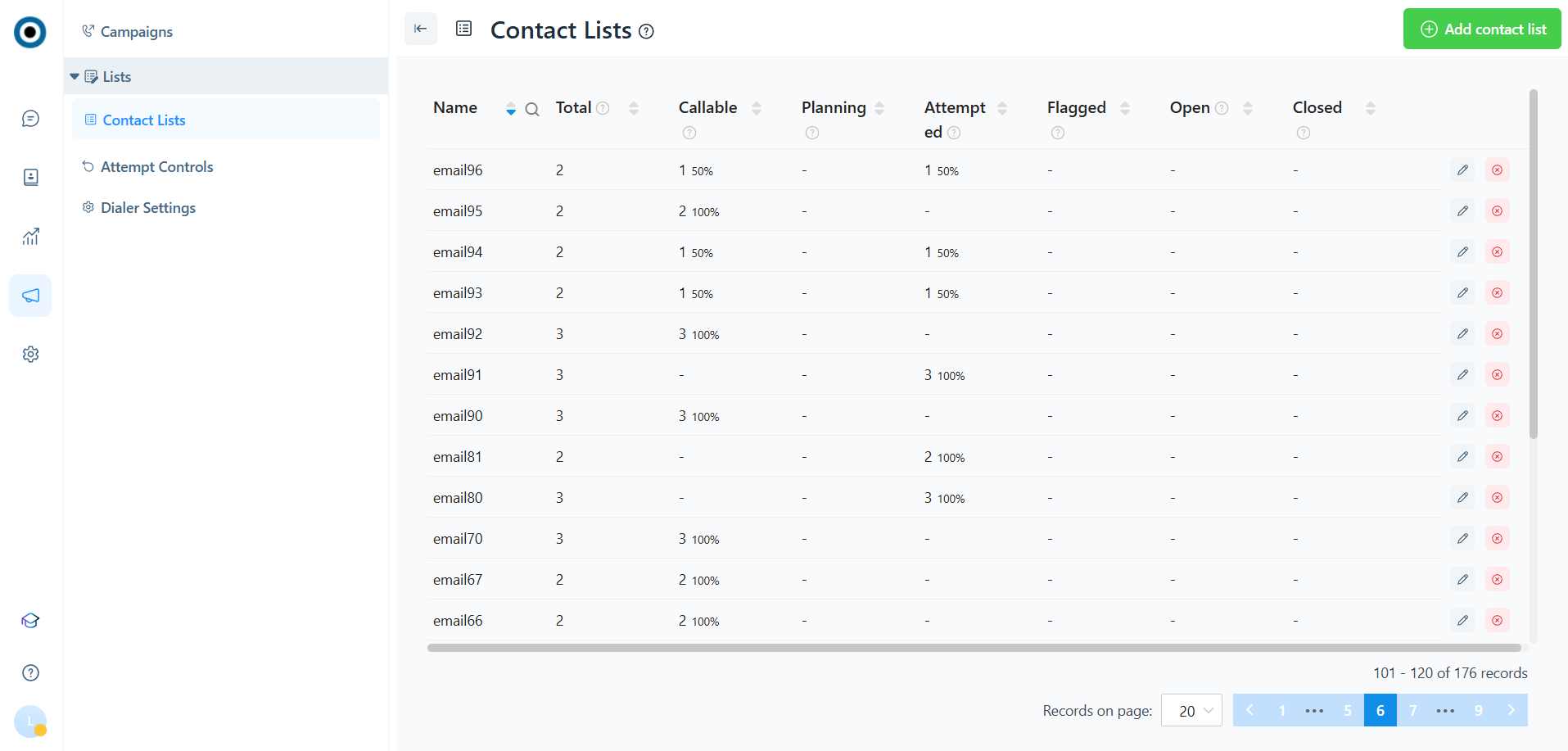
1. Name of the contact list&#x20;
2. Total: number of contacts in the list&#x20;
3. Callable: contacts that are suitable for outbound activity&#x20;
4. Planning: contacts that are selected for processing by Dialer and for which an outgoing interaction is planned&#x20;
5. Open: contacts for which the outbound activity was successfully completed and are in an incomplete status (waiting for a customer response or being processed by a chatbot/operator)&#x20;
6. Attempted: contacts for which the maximum number of attempts has been reached&#x20;
7. Flagged: contacts for which there are no communication units (phone numbers, emails, etc.) suitable for outbound activities with the corresponding type of conversation&#x20;
8. Closed: contacts for which the outbound activity was successfully performed and completed Campaign status: active or completed. To launch a campaign, you need to transfer

***

### Create/Edit a contact list&#x20;

#### When creating a contact list, you need to specify the following parameters:

<figure><img src="/files/KvYDc4cI0L5VlMlY4tMy" alt=""><figcaption></figcaption></figure>

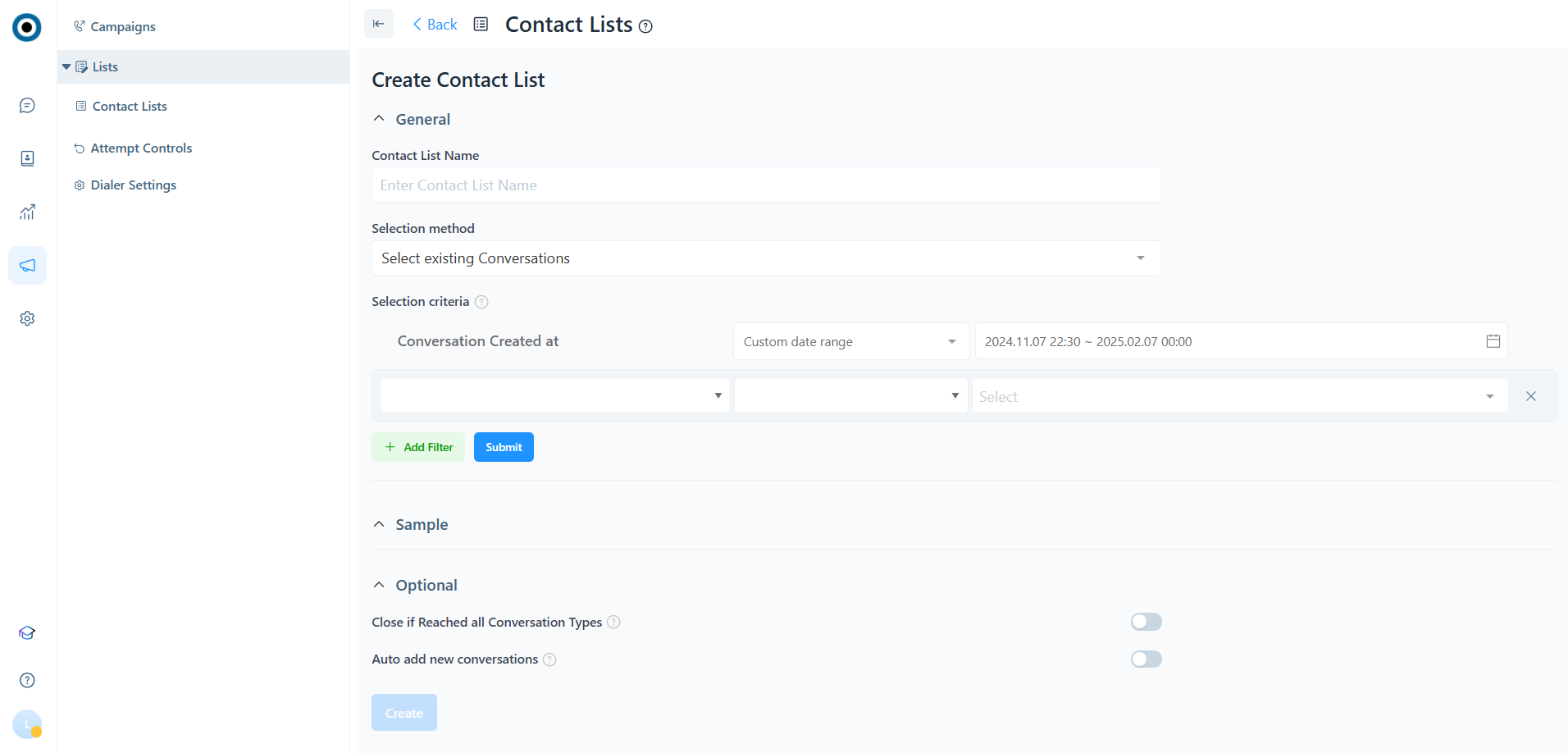
1. Contact list name
2. A method of selecting contacts for uploading. Contacts can be selected from existing NovaTalks conversations or uploaded as a file.

#### For Selection method = Select existing conversations, you need to specify the following parameters:

1. Criteria for selecting NovaTalks conversations.&#x20;
2. Sample - a table with a list of found conversations and their parameters. It is displayed if at least 1 conversation has been found in the system according to the created filter. The sample is needed to make sure that the selection is configured correctly. Close if all types of calls have been processed successfully. If this option is enabled, the contact is successfully closed if all conversation types (social media, email, calls) have been successfully completed. If disabled, the contact will be closed successfully if at least one type of conversation has a successful outgoing activity.

{% hint style="info" %}
This option is used if you need communicate with a contact through all channels, for example, in the messenger and via email.
{% endhint %}

4. Automatically add new conversations. If this option is enabled, the system will automatically add new conversations that meet the filter criteria at a specified frequency.

{% hint style="info" %}
For example, you've created a live campaign that's always on and sends customers who have purchased a product a message with a promo code for a discount on their next purchase.
{% endhint %}

5. The frequency with which you want to automatically upload new conversations to the list of contacts that match the specified filter. The default value is every day at 00:00

#### For Selection method = Select existing conversations, you need to specify the following parameters:

<figure><img src="/files/Wn46n1JN9woWLdKmzlrM" alt=""><figcaption></figcaption></figure>

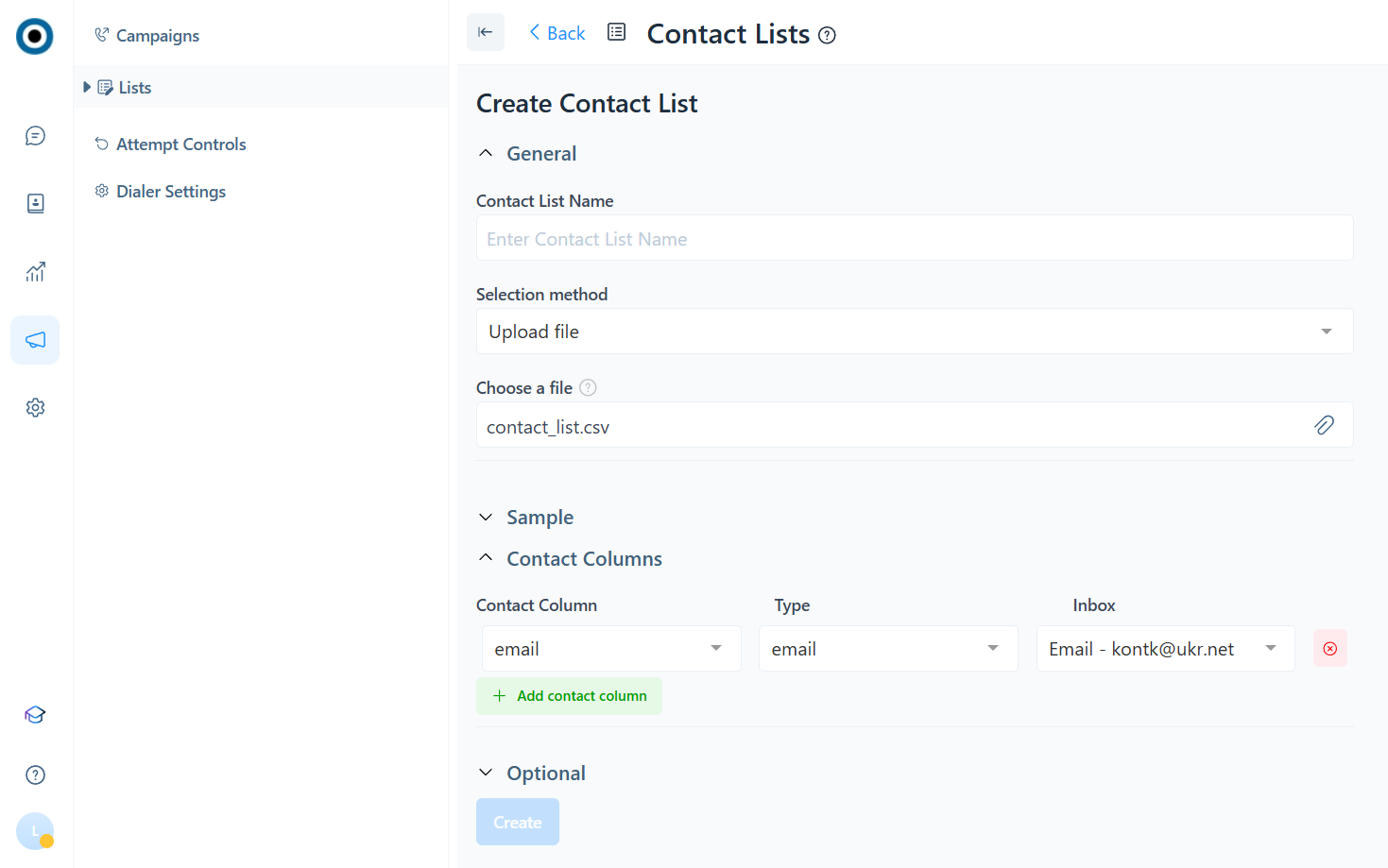
1. File with contacts for upload. The format is csv (comma delimited), where the first line contains the column names, and all subsequent lines contain contacts and their data. When editing a contact list, you can upload additional data through this field. The format of the original file and the uploaded file must be the same.

{% hint style="success" %}
Example:

id,email,full\_name,debt&#x20;

1,<stonadya@ukr.net>,nadya,75.25&#x20;

2,<nadiia@com.ua>,nadiia,150.5&#x20;

3,<cristina@com.ua>,cristina,225.75
{% endhint %}

2. Sample - a table with a list of data loaded from a file.&#x20;
3. Contact columns are the contact details that you need to use to reach the customer - for example, phone numbers, email addresses, NovaTalks call IDs, etc. A contact can have several contact details. In this case, the system will try to contact the contact for each contact unit.&#x20;

For each communication unit, you need to select its type and the channel from which the outgoing activity will be carried out.

{% hint style="info" %}
You do not need to specify a channel for the Call ID type. The system will automatically detect it.
{% endhint %}

4. Close if Reached all Conversation Types. If this option is enabled, the contact is closed successfully if all conversation types (social media, email, calls) have successfully completed an outgoing activity. If disabled, the contact will be closed successfully if at least one type of conversation has a successful outgoing activity.

{% hint style="info" %}
This option is used if you need to communicate with the contact via all channels, for example, in the messenger and via email.
{% endhint %}

5. Unique identifier - a field for selecting a column that will serve as a unique identifier. If you do not select anything, the system will fill in the number in order.&#x20;
6. Contact name - a field for selecting a column that will serve as a contact name if the system does not find an existing contact. Then the system creates a new contact using the name from the column.

### **Description of Contact List and Contact List Detail data**

**Contact List** is a table of contacts where 1 row = 1 contact. It contains information about the status and attempts of outgoing interactions for each conversation type, as well as overall contact-level data. It may also include additional contact information for later use during the execution and processing of outgoing interactions.

<table><thead><tr><th width="212.400146484375">Назва поля</th><th>Опис</th></tr></thead><tbody><tr><td>sys_id</td><td><p>Unique contact identifier. It is filled in automatically by the system depending on the settings, using the following data:</p><ol><li>NovaTalks Contact ID – if [Contact List Settings] Selection method = Select existing Conversations</li><li>Sequential number – if [Contact List Settings] Selection method = Upload file AND [Contact List Settings] Unique Identifier Column is not filled in</li><li>User-defined field data – if [Contact List Settings] Selection method = Upload file AND [Contact List Settings] Unique Identifier Column is filled in, then the values from this field are written to sys_id.</li></ol><p>If the field contains non-unique values, only the first contact with such an ID must be retained, and all other duplicates must be removed. If the field contains empty values, such rows must be deleted.</p></td></tr><tr><td>sys_status</td><td>Contact status</td></tr><tr><td>sys_attempts</td><td>The number of times the Dialer has performed an outgoing interaction for the contact.</td></tr><tr><td>sys_status_call</td><td>Status of the corresponding conversation type of the contact.</td></tr><tr><td>sys _attempts_call</td><td>The number of times the Dialer has performed an outgoing interaction where conversation_type = call.</td></tr><tr><td>sys _attempts_email</td><td>The number of times the Dialer has performed an outgoing interaction where conversation_type = email.</td></tr><tr><td>sys _attempts_social_media</td><td>The number of times the Dialer has performed an outgoing interaction where conversation_type = social_media.</td></tr><tr><td>sys_created_at</td><td>Record creation date and time.</td></tr><tr><td>sys_updated_at</td><td>Record update date and time.</td></tr><tr><td>sys_last_attempt_cld_id</td><td>ID of the record from Contact List Detail that corresponds to the contact for which the last outgoing interaction attempt was made.</td></tr><tr><td>User-created fields (if any exist).</td><td></td></tr></tbody></table>

The **sys\_status** field can take the values listed in the table below:

<table><thead><tr><th width="95.39996337890625">Status</th><th width="208.4000244140625">Short Description</th><th>Description</th></tr></thead><tbody><tr><td>I</td><td>in progress</td><td>The Dialer selected a record from Contact List Detail for this contact to perform an outgoing interaction.</td></tr><tr><td>A</td><td>reached max attempts per contact</td><td>The maximum number of attempts per contact (Max Attempts Per Contact) has been reached for this contact.</td></tr><tr><td>U</td><td>uncallable</td><td>Not eligible for outgoing interaction. This status is assigned when the contact has been successfully processed.</td></tr><tr><td>C</td><td>callable</td><td>The contact is eligible for outgoing interaction.</td></tr><tr><td>Q</td><td>queued</td><td>The Dialer successfully performed the outgoing interaction and passed it to the Campaign Manager for further processing.</td></tr><tr><td>F</td><td>no callable records in Contact List Detail</td><td>There are no records in Contact List Detail for this contact that are eligible for outgoing interaction.</td></tr></tbody></table>

The **sys\_status\_email** and **sys\_status\_social\_media** fields can take the values listed in the table below:

<table><thead><tr><th width="95.39996337890625">Status</th><th width="208.4000244140625">Short Description</th><th>Description</th></tr></thead><tbody><tr><td>I</td><td>in progress</td><td>The Dialer selected a record from Contact List Detail for the corresponding conversation type of the contact to perform an outgoing interaction.</td></tr><tr><td>A</td><td>reached max attempts per contact</td><td>The maximum number of attempts (Max Attempts Per ) has been reached for the corresponding conversation type of the contact.</td></tr><tr><td>U</td><td>uncallable</td><td>Not eligible for outgoing interaction. This status is assigned when the contact for the corresponding conversation type has been successfully processed.</td></tr><tr><td>C</td><td>callable</td><td>The contact is eligible for outgoing interaction for the corresponding conversation type.</td></tr><tr><td>Q</td><td>queued</td><td>The Dialer successfully reached the contact for the corresponding conversation type and passed it to the Campaign Manager for further processing.</td></tr><tr><td>F</td><td>no callable records in Contact List Detail</td><td>There are no records in Contact List Detail for this contact that are eligible for outgoing interaction with the corresponding conversation_type.</td></tr></tbody></table>

**Contact List Detail** is a table in which each contact is split into separate rows, where 1 row = 1 contact communication unit (phone numbers, emails, conversation IDs, etc.). It contains information about the status, attempts, and other details of outgoing interactions.

<table><thead><tr><th width="210.7999267578125">Назва поля</th><th>Опис</th></tr></thead><tbody><tr><td>sys_id</td><td>Unique record identifier. It is automatically filled in as a sequential number.</td></tr><tr><td>sys_contact_id</td><td>ID of the contact to which the record belongs (from Contact List sys_id).</td></tr><tr><td>sys_channel_user</td><td><p>Communication unit for performing an outgoing interaction with a contact, where 1 row = 1 contact communication unit. Depending on the settings, it is filled with the following data:</p><ol><li>Conversation ID from NovaTalks – if [Contact List Settings] Selection method = Select existing Conversations</li><li>Values from the columns of the file uploaded by the user. Such columns are selected by the user in [Contact List Settings] as contact columns – if [Contact List Settings] Selection method = Upload file</li></ol></td></tr><tr><td>sys_channel_user_type</td><td><p>Type of communication unit. Depending on the settings, it is filled with the following data:</p><ol><li>phone/email/conversation_id/messenger_id/username: set according to the value selected by the user in [Contact List Settings] Type – if [Contact List Settings] Selection method = Upload file</li><li>conversation_id – if [Contact List Settings] Selection method = Select existing Conversations</li></ol></td></tr><tr><td>sys_cl_source_column</td><td><p>Name of the column from the file uploaded by the user to which sys_channel_user belongs:</p><ol><li>Filled with the name of the corresponding column – if [Contact List Settings] Selection method = Upload file</li><li>conversation_id – if [Contact List Settings] Selection method = Select existing Conversations</li></ol></td></tr><tr><td>sys_conversation_type</td><td><p>conversation_type inbox_id to which sys_channel_user belongs.</p><p>Possible values:<br>call<br>email<br>social_media</p></td></tr><tr><td>sys_inbox_id</td><td><p>ID of the channel from which the outgoing interaction should be performed. It is determined based on the sys_channel_user type:</p><ul><li>For phone/email/messenger_id/username – the inbox_id selected by the user in [Contact Lists Settings] is used.</li><li>For conversation_id – it must be determined automatically based on the conversation_id.</li></ul></td></tr><tr><td>sys_status</td><td>Record status</td></tr><tr><td>sys_attempts</td><td>The number of times the Dialer has performed an outgoing interaction for the contact.</td></tr><tr><td>sys_attempts_abandoned</td><td>The number of times the result of an outgoing interaction attempt was a Dialer Attempt Result with Dialer Attempt Category = abandoned.</td></tr><tr><td>sys_attempts_busy</td><td>The number of times the result of an outgoing interaction attempt was a Dialer Attempt Result with Dialer Attempt Category = busy.</td></tr><tr><td>sys_attempts_noanswer</td><td>The number of times the result of an outgoing interaction attempt was a Dialer Attempt Result with Dialer Attempt Category = noanswer.</td></tr><tr><td>sys_attempts_machine</td><td>The number of times the result of an outgoing interaction attempt was a Dialer Attempt Result with Dialer Attempt Category = machine.</td></tr><tr><td>sys_scheduled_at</td><td>Date and time before which a repeat outgoing interaction should not be performed.</td></tr><tr><td>sys_created_at</td><td>Record creation date and time.</td></tr><tr><td>sys_updated_at</td><td>Record update date and time.</td></tr><tr><td>sys_last_attempt_datetime</td><td>Date and time of the last outgoing interaction initiated by the Dialer for the record.</td></tr><tr><td>sys_last_attempt_campaign_id</td><td>Campaign ID within which the last outgoing interaction was initiated by the Dialer for the record.</td></tr><tr><td>sys_last_attempt_dialog_id</td><td>Dialog ID of the last outgoing interaction for the record.</td></tr><tr><td>sys_last_attempt_dialer_attempt_result_id</td><td>ID of the result of the outgoing interaction attempt performed by the Dialer.</td></tr></tbody></table>

The **sys\_status** field can take the values listed in the table below:

<table><thead><tr><th width="103.39996337890625">Status</th><th width="194.7999267578125">Short Description</th><th>Description</th></tr></thead><tbody><tr><td>C</td><td>callable</td><td>The record is eligible for outgoing interaction.</td></tr><tr><td>I</td><td>in progress</td><td>The Dialer selected a record to perform an outgoing interaction.</td></tr><tr><td>A</td><td>reached max attempts per number or recall type</td><td>The maximum number of attempts (Max Attempts Per Conversation or Max Attempts Per ) has been reached for the record.</td></tr><tr><td>U</td><td>uncallable</td><td>Not eligible for outgoing interaction. This status is assigned when the record has been successfully processed or connected to the wrong party.</td></tr><tr><td>O</td><td>auto-sheduled callback</td><td>Another outgoing interaction for the record is scheduled by the Dialer according to the Campaign settings.</td></tr><tr><td>S</td><td>callback by agent</td><td>Another outgoing interaction for the record is scheduled by the Agent.</td></tr><tr><td>P</td><td>purged</td><td>No conversation was found in the system for the record with sys_channel_user_type = conversation_id.</td></tr><tr><td>Q</td><td>queued</td><td>The Dialer successfully reached the contact and passed it to the Campaign Manager for further processing.</td></tr></tbody></table>


---

# Agent Instructions: Querying This Documentation

If you need additional information that is not directly available in this page, you can query the documentation dynamically by asking a question.

Perform an HTTP GET request on the current page URL with the `ask` query parameter:

```
GET https://help.novatalks.com.ua/en/get-started/outgoing-campaigns/lists/contact-list.md?ask=<question>
```

The question should be specific, self-contained, and written in natural language.
The response will contain a direct answer to the question and relevant excerpts and sources from the documentation.

Use this mechanism when the answer is not explicitly present in the current page, you need clarification or additional context, or you want to retrieve related documentation sections.
