> For the complete documentation index, see [llms.txt](https://help.novatalks.com.ua/ua/llms.txt). Markdown versions of documentation pages are available by appending `.md` to page URLs; this page is available as [Markdown](https://help.novatalks.com.ua/ua/get-started/settings/calendars.md).

# Календарі

## Список Календарів <a href="#calendars-list" id="calendars-list"></a>

В розділі **Календарі** можна створювати різні календарі робочого часу для використання у інших функціоналах.&#x20;

Календарі використовуються у функціоналі [Чат-Боти](/ua/get-started/settings/chatbots.md).

<figure><img src="/files/DpGy6dPVOMgdZEffrpft" alt=""><figcaption></figcaption></figure>

Для створення нового календарю/редагування існуючого необхідно обрати **Додати календар/Редагувати календар.**

***

### Створення/Редагування Календарю <a href="#create-edit-a-calendar" id="create-edit-a-calendar"></a>

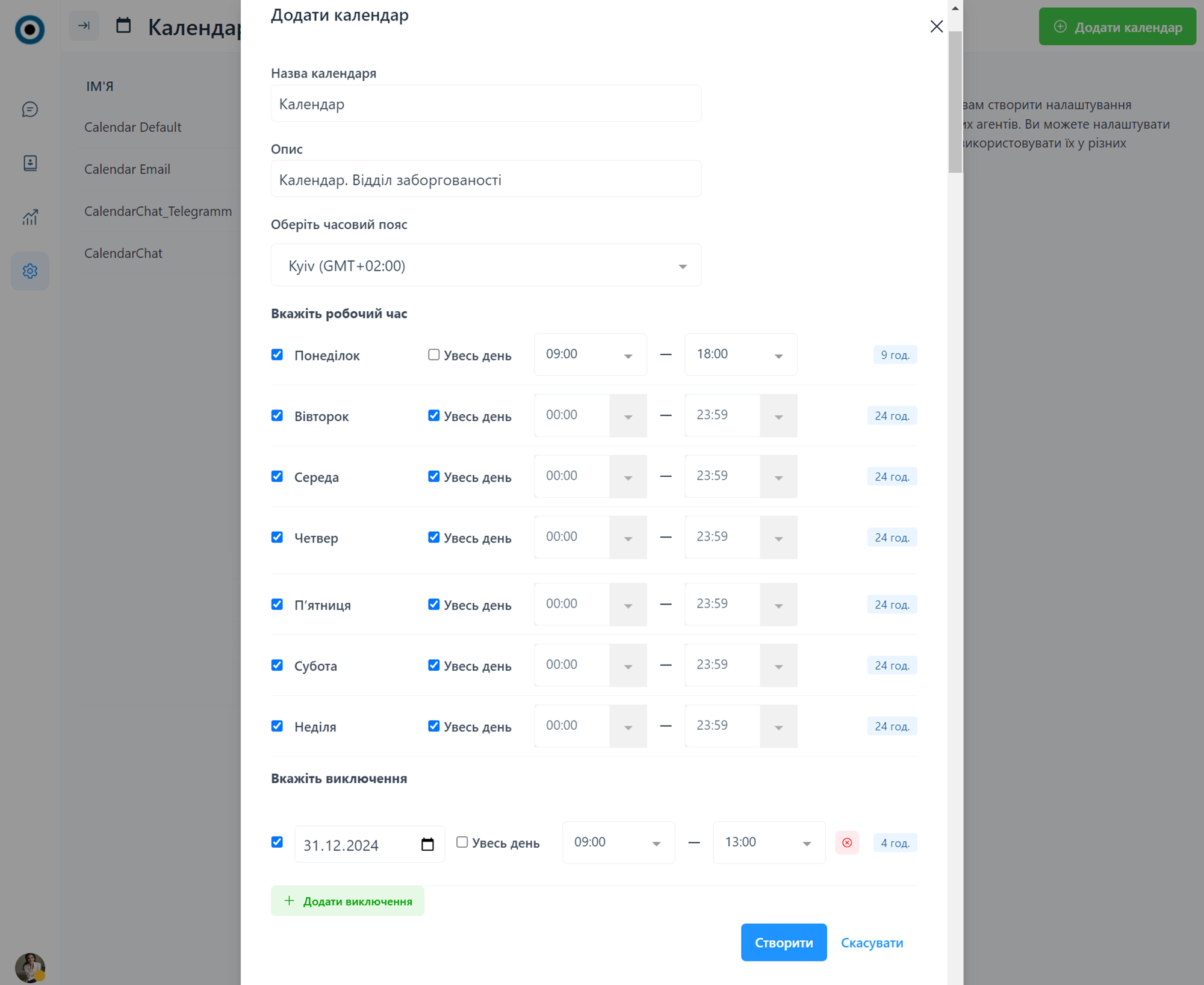
<figure><img src="/files/jcAv84vKOVTHE2WI77L8" alt=""><figcaption></figcaption></figure>

1. **Назва календаря**
2. **Опис**
3. **Оберіть часовий пояс -** часовий пояс, в якому Календар планується використовуватись.
4. **Вкажіть робочий час -** робочий час для кожного дня тижня.
5. **Вкажіть виключення** - дати, в які робочий час відрізняється, наприклад святкові дні.

---

# Agent Instructions
This documentation is published with GitBook. GitBook is the documentation platform designed so that both humans and AI agents can read, navigate, and reason over technical content effectively. Learn more at gitbook.com.

## Querying This Documentation
If you need additional information that is not directly available in this page, you can query the documentation dynamically by asking a question.

Perform an HTTP GET request on the current page URL with the `ask` query parameter:

```
GET https://help.novatalks.com.ua/ua/get-started/settings/calendars.md?ask=<question>
```

The question should be specific, self-contained, and written in natural language.
The response will contain a direct answer to the question and relevant excerpts and sources from the documentation.

Use this mechanism when the answer is not explicitly present in the current page, you need clarification or additional context, or you want to retrieve related documentation sections.
